Garba night dance videos are popular on Instagram Reels and YouTube Shorts, especially during Navratri and festive celebrations. These videos combine traditional Gujarati outfits, colorful lights, energetic dance moves, and cinematic transitions to create an attractive look. If you love making aesthetic videos and want to create a trending Garba night dance edit, this tutorial will help you understand the process step by step. You do not need professional editing skills or expensive equipment to get started. With a few video clips, a suitable Garba song, and a mobile editing application, you can create a beautiful festive video that looks stylish and engaging. In this article, Prompt Seen will guide you through the basic editing process and share useful tips for creating your own Garba night dance video.
What Is the Garba Night Dance Editing Trend?
The Garba night dance editing trend focuses on presenting traditional dance moments in a cinematic and eye-catching style. These videos often feature girls wearing colorful chaniya choli, traditional jewelry, bangles, and dupattas while dancing under decorative lights. Slow-motion shots, beat synchronization, smooth transitions, and vibrant color grading make the final video more appealing. You can use this editing style to showcase your Navratri outfit, dance performance, or memorable moments with friends. To achieve the best results, choose clips with good lighting and clear movement. Recording a few wide shots along with close-up shots of your outfit, jewelry, and dance steps will give you more creative options during editing. You can also select a trending Garba or Gujarati folk song that matches the mood of your footage.
How to Edit a Garba Night Dance Video on Your Phone
You can edit your Garba night dance video using mobile applications such as VN Video Editor or CapCut, depending on their availability in your region. First, collect your favorite dance clips and import them into the editing application. Set the project to a vertical 9:16 aspect ratio for Instagram Reels and YouTube Shorts. Trim the clips according to the rhythm of your selected song and place the most attractive shot at the beginning to grab viewers’ attention. Add smooth transitions between clips, use slow motion for graceful dance movements, and synchronize important moments with the music beats. You can also adjust brightness, contrast, saturation, and sharpness to make the festive lights and outfit colors stand out. Avoid using too many effects at once because clean editing often looks more professional than an overloaded video. Finally, preview the complete video and export it in 1080p resolution when available.
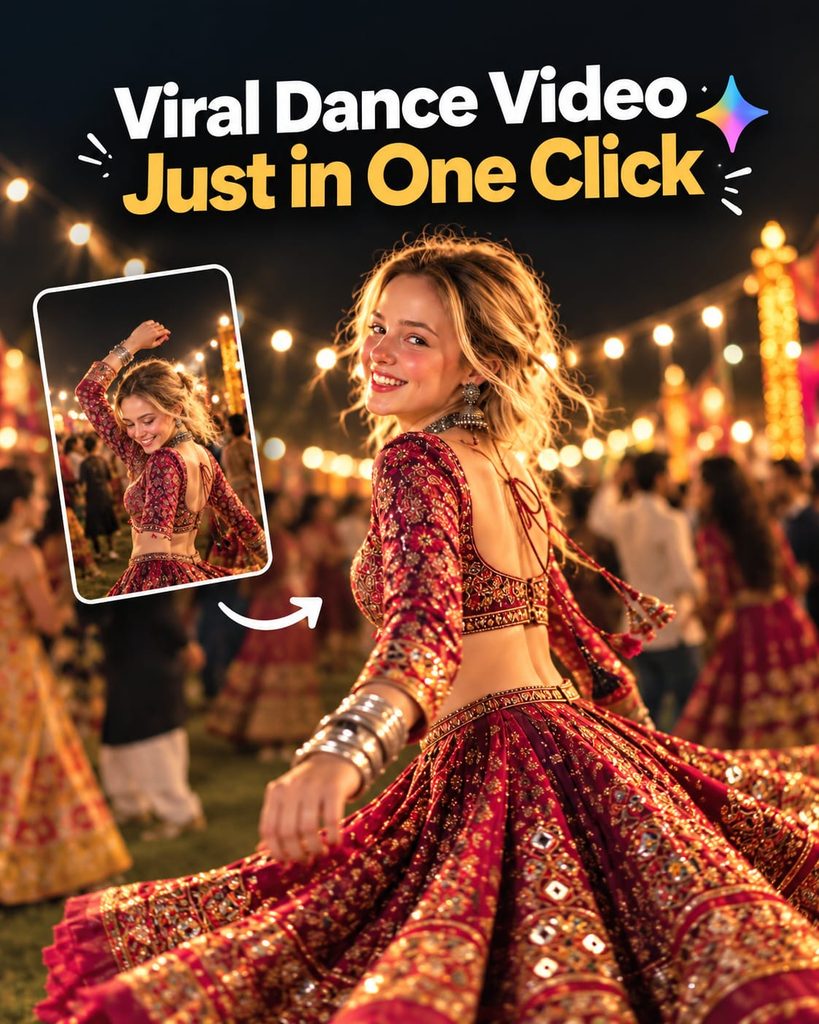
Create a cinematic 4K, highly detailed, photorealistic video by transferring the EXACT dance movements, body motion, performance, timing, expressions, and camera movements from the REFERENCE VIDEO onto the person shown in the TARGET IMAGE. Completely replace the original main dancer with the person from the TARGET IMAGE. Preserve the target person's exact facial identity, facial features, skin tone, hairstyle, and natural appearance. Do not retain the original dancer's face. Do not alter, beautify, or

distort the target person's identity. Maintain consistent facial identity throughout the video.

Dress the target person in a stunning traditional Indian lehenga choli in deep maroon and gold, featuring intricate embroidery, shimmering sequins, a traditional choker necklace, and matching earrings. Recreate the same outdoor nighttime celebration atmosphere, with a lively croud in a mix of casual and traditional Indian attire, bright overhead floodlights, and a festive mood.

Follow the exact camera movement and framing of the reference video, starting with a dynamic tracking shot around the spinning dancer and ending with a stable, intimate shot of the person's smiling face and sparkling jewelry. Ensure cinematic 4K quality, realistic skin texture, natural dance physics, vibrant colors, shallow depth of field, soft bokeh, and high-quality motion blur.Best AI Prompt for a Garba Night Dance Video
If you want to create a cinematic Garba night dance video with an AI video editing or generation tool, you can use a detailed prompt to describe the scene, clothing, lighting, and camera movement. Upload a suitable reference image if your chosen tool supports image-to-video generation, and use the following ready-to-copy prompt as a starting point: “Create a realistic, cinematic Garba night dance video featuring a young Indian woman celebrating Navratri at a beautifully decorated outdoor Garba event. She is wearing a vibrant traditional Gujarati chaniya choli with colorful embroidery, a flowing dupatta, traditional earrings, bangles, and elegant festive jewelry. She performs graceful Garba dance steps with natural hand movements and joyful expressions while colorful decorative lights illuminate the background. Include dynamic camera movements, smooth cinematic tracking shots, gentle slow-motion moments, realistic fabric movement, warm festive lighting, and rich but natural colors. Add a lively Navratri celebration atmosphere with other dancers softly visible in the background. Maintain realistic body proportions, natural facial details, consistent clothing, and smooth motion throughout the video. Vertical 9:16 composition, high visual quality, realistic lighting, and a polished Instagram Reels aesthetic.” Always review the generated result because the quality and consistency of AI videos depend on the tool and the reference material you provide.
Best Effects and Settings for a Cinematic Garba Reel
The right effects can make your Garba night dance video look more attractive without losing its traditional charm. Try gentle slow motion for twirling movements, beat-sync cuts for energetic dance sequences, and subtle glow effects for decorative lights. Warm color grading can enhance the festive atmosphere, while carefully adjusted contrast and saturation can make colorful outfits look vibrant. Use motion blur sparingly during fast transitions and avoid excessive sharpening, which can make faces and clothing appear unnatural. For the audio, select a song that matches the pace of your clips and keep the music clear throughout the video. If you are editing in VN or CapCut, explore the available filters, keyframes, speed controls, and transition options to develop your own style. Export your final video at 1080p and 30 or 60 frames per second, depending on your footage and the options available in your editing app.
Tips to Make Your Garba Night Dance Video More Engaging
To make your Garba night dance reel more engaging, start with your best dance moment, a beautiful outfit reveal, or a visually striking shot of the festive venue. Keep the introduction short so viewers can quickly understand the video. Choose a clean cover image and add a simple title if it suits your editing style. Use consistent colors and transitions to maintain a smooth visual flow, and avoid placing text over important parts of the dance. Record your clips vertically whenever possible and make sure your subject is well-lit, especially during nighttime celebrations. You can also experiment with different camera angles, including full-body shots, close-ups, and circular movements around the dancer. When uploading your reel, write a natural caption and use a few relevant hashtags, such as #GarbaNight, #NavratriSpecial, #GarbaDance, and #DanceReels. Use music you are permitted to share on your chosen platform and avoid promising that any particular editing style will automatically make a video go viral.
Conclusion
Creating a Garba night dance video for girls is a fun way to celebrate Navratri and share your festive memories on social media. With the right dance clips, suitable music, smooth transitions, and natural color grading, you can make an attractive reel directly from your phone. You can also experiment with the AI prompt provided in this article to explore a cinematic Garba-inspired video style. Start with simple edits, practice beat synchronization, and gradually develop your own creative approach. Visit Prompt Seen for more video editing tutorials, trending editing ideas, AI prompts, and helpful resources to improve your content creation skills. Whether you are a beginner or an experienced editor, a little creativity and practice can help you create beautiful festive videos worth sharing.