Viral cricket shot AI videos are gaining attention on Instagram Reels, YouTube Shorts, and other social media platforms because of their realistic cricket action, cinematic camera movements, and exciting visual effects. These videos can show powerful batting shots, sixes flying into the crowd, dramatic stadium celebrations, and slow-motion cricket moments created with the help of artificial intelligence. The best part is that you do not need professional video editing skills or expensive equipment to create this type of content. With a suitable AI video generator and a well-written prompt, beginners can turn their creative ideas into engaging cricket videos using a smartphone or computer. In this Viral Cricket Shot AI Video Tutorial, you will learn how to find the prompt, generate your video, and improve the final result for social media.
How to Create a Viral Cricket Shot AI Video
Creating an AI cricket shot video is a simple process when you follow the correct steps. First, open Google and search for Prompt Seen, then visit the website and find the article about the viral cricket shot AI video tutorial. Open the article and copy the ready-to-use video prompt provided there. Next, open an AI video generation tool that supports text-to-video or image-to-video creation. Paste the prompt into the prompt box and select the available settings according to your requirements. If the tool supports reference images, you can upload a suitable cricket image to guide the visual appearance of the scene. Start generating the video and wait for the result. Once the video is ready, preview it to check the batting action, ball movement, player appearance, and stadium background. If something looks unnatural, adjust the prompt and generate another version until you achieve a result you like.
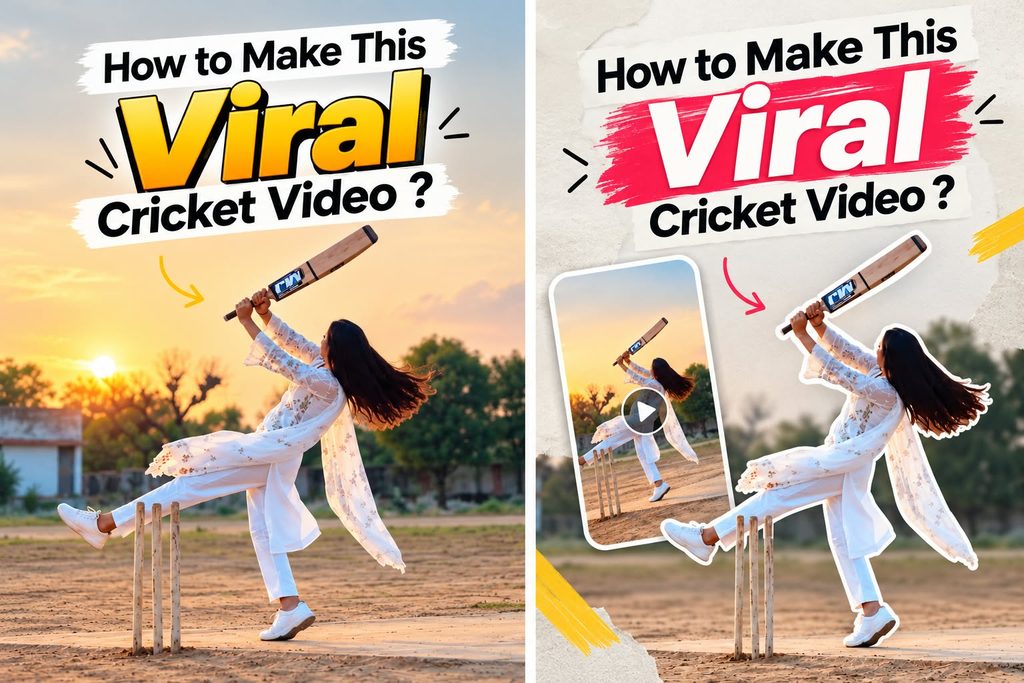
Video Prompt
Video prompt.


Create an ultra-realistic cinematic video matching the provided reference video as closely as possible. Vertical 9:16 aspect ratio, 4K quality, natural lighting, realistic human movements, and a continuous single camera shot.


Scene and Character: A young Indian woman wearing a beautiful white embroidered salwar kameez, matching white trousers, and a lightweight white dupatta. Her long, dark hair is tied back. She is standing on a flat, dusty cricket ground in a rural Indian village. Three cricket stumps are placed beside her on the left side of the frame. In the background, there are green trees, a small rural building, an open field, and a pale cloudy evening sky.


ACTION — SECOND BY SECOND:


0–2 seconds: The woman stands beside the cricket stumps, holding a wooden cricket bat with both hands. She bends forward slightly and looks toward the expected direction of the cricket ball. Her posture is focused and natural.


2–4 seconds: She prepares to play a cricket shot, adjusting her stance and bringing the bat upward. Her white dupatta hangs naturally and moves gently with her body.


4–6 seconds: She swings the cricket bat upward with both hands, turning her body naturally. One leg rises as she performs an energetic batting follow-through. Her long hair and white dupatta flow naturally with the movement.


6–8 seconds: She continues the batting action, lifting the bat high above her shoulder and briefly balancing on one foot. Her movements resemble the reference video, with realistic body weight and natural cloth physics.


8–10 seconds: She brings the bat down in front of her, steps forward, and finishes the movement. She turns slightly toward the camera with a relaxed facial expression while standing on the cricket pitch.


CAMERA AND VISUAL STYLE: Fixed camera position, full-body wide shot, eye-level perspective, the woman visible from head to toe throughout the video. Keep the cricket stumps visible on the left. No cuts, no camera shakes, no sudden zooms, and no scene transitions. Soft natural daylight, realistic shadows, natural skin texture, detailed white fabric embroidery, realistic hair movement, and authentic rural Indian surroundings.


IMPORTANT CONSISTENCY RULES: Maintain the same woman's face, hairstyle, white outfit, cricket bat, body proportions, background, and camera angle throughout the entire video. Make the action continuous, physically believable, and as close to the reference footage as possible. Do not add a visible cricket ball unless it is present in the reference.


NEGATIVE PROMPT: Cartoon, animation, unrealistic movements, extra fingers, deformed hands, distorted face, duplicate person, extra cricket bats, floating objects, changing clothes, changing background, incorrect cricket stumps, flickering, unnatural body movement, camera cuts, artificial lighting, text, subtitles, logos, and watermarks.Ready-to-Copy Viral Cricket Shot AI Video Prompt
To create a realistic cricket shot video, you need a detailed prompt that describes the player, batting action, stadium atmosphere, and camera movement. Copy the following sample prompt and paste it into an AI video generator that supports your preferred generation method: Create an ultra-realistic cinematic cricket video featuring a professional male cricket batter standing on the pitch inside a massive international cricket stadium during an exciting match. The batter wears a realistic cricket uniform, batting gloves, protective pads, and a helmet. A fast bowler delivers the ball toward the batter, who carefully watches the delivery and performs a powerful, technically correct cricket shot, sending the ball high into the air toward the boundary. Show the cricket bat making realistic contact with the ball, accurate body movement, natural footwork, believable ball physics, and a convincing follow-through. As the ball travels toward the stands, capture the excitement of the cheering crowd under bright stadium floodlights. Use dynamic sports cinematography, smooth tracking shots, dramatic slow motion at the moment of impact, realistic shadows, detailed grass, natural colors, and professional broadcast-quality visuals. Maintain consistent player appearance, realistic anatomy, accurate cricket equipment, and smooth movement throughout the scene. Vertical 9:16 aspect ratio, high visual quality, suitable for Instagram Reels and YouTube Shorts, no unnecessary text, no logos, and no watermark. You can customize this prompt to create different batting shots, such as a straight drive, cover drive, pull shot, or powerful lofted shot, depending on the capabilities of your AI tool.
Best AI Tools for Creating Cricket Shot Videos
Choosing a suitable AI video generator can make a significant difference in the quality of your cricket video. Look for a tool that supports realistic human movement, image references, camera control, and smooth video generation. Text-to-video tools are useful when you want to create a cricket scene entirely from a written description, while image-to-video tools can animate an existing cricket photograph into a moving scene. Some platforms also offer options for adjusting the duration, aspect ratio, and visual style of the generated clip. Availability of these features may vary depending on the platform, subscription plan, and current tool version. Before choosing a tool, check its free usage limits, export quality, commercial-use terms, and watermark policy. You can experiment with different tools to find the one that produces the most convincing batting action for your particular idea.
Tips to Make Your AI Cricket Shot Look Realistic
If you want your cricket AI video to look professional, focus on realistic movement and a clear description of the main action. Explain how the batter prepares for the shot, makes contact with the ball, and completes the follow-through. Avoid adding too many unrelated actions to a single short clip because this can make the generated movement inconsistent. Use camera instructions such as a side-angle tracking shot, a close-up of bat-ball contact, or a wide stadium view to create a more engaging result. If your tool supports image references, use an appropriate image to help guide the scene. Generate multiple versions when necessary, as small changes in the prompt can improve the final output. For the best results, review the bat shape, hands, cricket ball, player anatomy, and ball trajectory before publishing. Remember that AI-generated videos may contain visual errors, so careful checking and editing are important.
How to Edit and Upload Your Cricket AI Video
After generating your cricket shot video, import it into a video editing application such as CapCut to prepare it for social media. Trim unnecessary frames, adjust the timing, and place the most exciting moment near the beginning to capture the viewer’s attention. You can add cricket stadium sounds, suitable background music, subtle color correction, and smooth transitions to improve the overall presentation. Keep the video in a vertical 9:16 format for Instagram Reels and YouTube Shorts, provided that it suits the composition of your footage. Add a short, relevant title if needed, and choose a caption that accurately describes the AI-generated cricket scene. Use a few relevant hashtags rather than filling the caption with unrelated keywords. Before uploading, check the platform’s rules regarding AI-generated or synthetic content and use music and other assets that you have permission to publish. If the scene depicts a real cricket player or a fictional match, avoid presenting fabricated footage as genuine match footage.